

How to Set Up Instagram Comment-to-DM Automation (2026)
Set up Instagram comment-to-DM automation in 2026: the requirements, a 7-step setup, Instagram's API rules, and the cheapest tool to do it from $3.60/mo.
 Hevin Kalathiya ·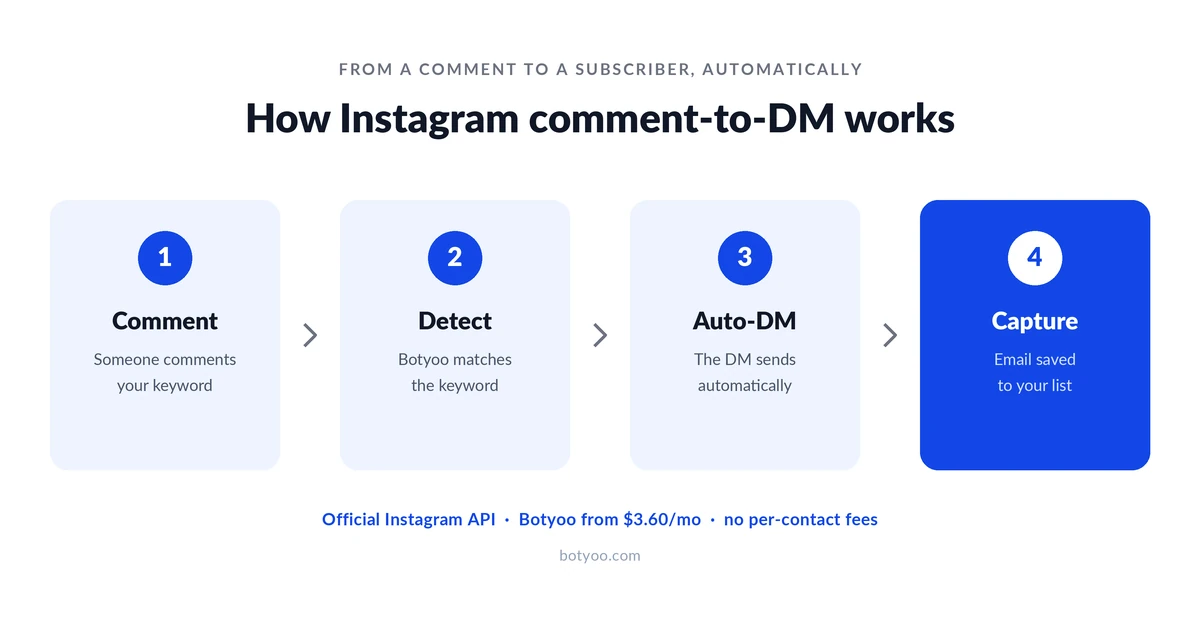
You have seen the posts: “Comment GUIDE and I’ll DM you the link.” The creator types one caption, and a tool delivers the link to everyone who comments, automatically. That is comment-to-DM automation, and setting it up takes about 15 minutes once your account is ready. Here is exactly how to do it, the Instagram rules you have to follow, and what it costs.
What is Instagram comment-to-DM automation?
Instagram comment-to-DM automation sends an automatic direct message to anyone who comments a chosen keyword on your post, using the official Instagram API, available to Business and Creator accounts. Someone comments your keyword, the tool detects it, and a DM lands in their inbox with whatever you set up: a link, a discount code, a PDF, or a question that starts a conversation.
It is the highest-intent funnel on Instagram because the person raised their hand first. They commented, so the DM is welcome rather than cold. Done right, it turns a single reel into a list-building machine.
What you need before you start
Three things, and the first two are free:
- An Instagram Business or Creator account. Comment-to-DM runs on Meta’s official Instagram API, which is only available to Business and Creator accounts, not personal ones. Switching is free and takes two minutes in your profile settings.
- A connected Facebook Page. The Instagram API authorizes through a linked Facebook Page. You do not have to post to the Page; it just satisfies Meta’s connection requirement.
- An official-API comment-to-DM tool. This is the one paid piece. The tool must use the official Instagram API (Meta-approved), not a password login. Botyoo does this from $3.60/mo flat-rate; other options exist at higher prices.
Avoid any tool that asks for your Instagram username and password. That is scraping, it violates Meta’s terms, and it is the fastest way to get your account restricted.
How to set up Instagram comment-to-DM automation
Setting up Instagram comment-to-DM automation takes seven steps and about 15 minutes: switch to a Business account, connect a tool, pick the post and keyword, write the DM, add an email step, test it live, then monitor. Here is each step.
- Switch to a Business or Creator account. In Instagram, go to Settings, then Account type, and switch. Connect it to a Facebook Page when prompted.
- Connect your account to an official-API tool. Sign up for your tool and authorize Instagram through Meta’s official login screen. You are granting the app permission through Meta, never handing over your password.
- Create a comment-to-DM trigger. Choose which post the automation watches (a specific reel, or all future posts) and set the keyword that fires it, like
LINK,GUIDE, orPRICE. - Write the DM. Compose the message that gets sent. Keep it short, lead with the thing they asked for, and add one clear call to action. Set the public comment reply too (for example, “Sent! Check your DMs.”) so commenters know it worked.
- Add an email-capture step (optional but recommended). If your tool supports it, ask for an email inside the DM flow before you hand over the link. This turns a comment into a subscriber. Botyoo captures the email natively and syncs it to your list; most cheaper tools cannot.
- Test it on a live post. Comment your own keyword from a second account and confirm the DM arrives. Always test before you promote the post.
- Monitor and optimize. Watch which keywords and posts convert, then reuse the winners. Your analytics dashboard shows opens and click-throughs per flow.
That is the whole setup. The first one takes 15 minutes; every one after that takes about three.
Instagram’s comment-to-DM rules you need to know
Comment-to-DM is allowed because it responds to a user-initiated action, but Instagram’s API enforces hard limits you cannot exceed. Knowing them keeps your account safe.
- One private reply per comment. You can send one automated DM to a person per comment they leave. You cannot blast a commenter repeatedly.
- A 7-day response window. You have up to 7 days to send the automated DM after the comment (for Instagram Live, you can only message during the broadcast).
- 200 automated DMs per hour, per account. Instagram’s Graph API caps automated messages at roughly 200 per hour. Past that, automation pauses for about an hour, then resumes. A viral post still gets everyone, just spread across the queue.
- User-initiated only. Meta only permits automated DMs in response to a user action, like a comment, story reply, or incoming DM. You cannot cold-DM people who never interacted. These limits are documented in Meta’s Instagram Platform docs.
None of these are tool-specific; they are Instagram’s rules, identical across every official-API tool. Any tool promising unlimited cold DMs is breaking them.
Comment-to-DM best practices
A few habits separate funnels that convert from ones that get ignored:
- Put the keyword in the caption and say it out loud. “Comment GUIDE for the free checklist” outperforms hoping people guess. Tell them exactly what to type.
- Pick a simple, single keyword. One short word beats a phrase.
GUIDEis better thansend me the guide please. - Deliver value first, pitch second. Lead the DM with the thing they asked for. Earn the click before you ask for anything.
- Capture the email before the link. A link is a one-time visit; an email is a relationship. Ask for it in the flow.
- Don’t fake it. Only automate replies to real triggers. Buying comment pods or spamming breaks Instagram’s rules and your credibility.
The cheapest way to run comment-to-DM in 2026
Comment-to-DM automation works the same across every official-API tool, so price is the main differentiator, and Botyoo runs it from $3.60/mo flat-rate with built-in email capture, the lowest serious price in the category. ManyChat starts at $14/mo and bills per contact; InstantDM is $9.99/mo flat; CreatorFlow is $15/mo. For a full price breakdown, see our roundup of the cheapest Instagram DM tools and the ManyChat-alternatives comparison (internal links, publish once live).
If you want comment-to-DM plus email capture for the lowest flat fee, compare Botyoo’s plans. For ecommerce stores routing comments into product links and lead capture, Botyoo for ecommerce maps the flow to store use cases.
Comment-to-DM examples by niche
The mechanic is the same; the offer changes by audience. A few that work:
- Coaches: “Comment GUIDE for my free client-onboarding checklist.” The DM delivers the PDF and asks for an email to send future resources.
- Course creators: “Comment WAITLIST for early access.” The DM captures the email and tags them for the launch sequence.
- D2C / ecommerce brands: “Comment SHOP and I’ll send the link.” The DM drops the product link and a discount code, capturing the email first.
- Local businesses: “Comment BOOK for the calendar.” The DM sends the booking link.
- Newsletters: “Comment SUB and I’ll send the signup.” The DM captures the email straight into your list.
The pattern that converts across all of them is the same: a single clear keyword in the caption, value delivered first in the DM, and the email captured before the final link. That last step is why built-in email capture matters, it turns a one-time link click into a subscriber you can reach again.
FAQ
How do I automatically send a DM when someone comments on Instagram?
Connect an Instagram Business or Creator account to an official-API tool, create a comment-to-DM trigger that watches a post for a keyword, and write the DM it sends. When someone comments the keyword, the tool sends them the message automatically within Instagram’s 7-day reply window. Setup takes about 15 minutes.
Is comment-to-DM automation allowed on Instagram?
Yes, when it uses the official Instagram API. Comment-to-DM responds to a user-initiated action (the comment), which Meta permits. The rules are one automated reply per comment, a 7-day window, and about 200 automated DMs per hour per account. Tools that use password login instead of the official API are not allowed and risk your account.
Do I need a business account for comment-to-DM automation?
Yes. The official Instagram API is only available to Business and Creator accounts, not personal ones, and it authorizes through a connected Facebook Page. Switching account type is free and takes about two minutes in your Instagram settings.
What is the cheapest comment-to-DM tool?
Botyoo is the cheapest serious option at $3.60/mo flat-rate, including comment-to-DM, keyword auto-replies, AI replies, and built-in email capture on the official Instagram API. InstantDM ($9.99/mo) and CreatorFlow ($15/mo) are flat-rate alternatives; ManyChat starts at $14/mo on per-contact billing.
How many automated DMs can I send per hour on Instagram?
Instagram’s Graph API caps automated DMs at roughly 200 per hour per account. When you hit the limit, automation pauses for about an hour and then resumes, so a viral post still reaches everyone who commented, just spread out over time rather than all at once.
Last updated: June 2026. Instagram API limits reflect Meta’s published rules as of June 2026 and can change; verify current limits before relying on them.