

What Is a Meta Tech Provider? (And Why Botyoo Is One)
A Meta Tech Provider is a company Meta verifies to build on its official APIs. What it means, how it differs from a Business Partner, and why Botyoo qualifies.
 Hevin Kalathiya · · Updated June 18, 2026
 A Meta Tech Provider is a company Meta has formally verified to build on its official APIs (including the Instagram Graph API) on behalf of other businesses and creators. Botyoo is a verified Meta Tech Provider under Business Portfolio ID 612782324507047, which means Meta independently confirmed the business and reviewed how its app accesses Instagram data before it was ever allowed to touch a user’s account. This page explains what that status actually is, how it differs from the “Meta Business Partner” badge you’ll see on competitor sites, and exactly what it protects for you.
I’m the founder of Botyoo, so I’m not a neutral party. Every claim below is checkable against Meta’s own developer documentation, and I’ve kept it honest about what the status does and doesn’t mean.
TL;DR — Meta Tech Provider in 30 seconds
- Status: Botyoo is a verified Meta Tech Provider, granted only after Meta runs business verification and full App Review on every requested permission.
- Portfolio ID: 612782324507047, viewable inside Meta Business Manager under Access verification.
- API: Botyoo runs 100% on the official Instagram Graph API, the same API class ManyChat and other major tools use.
- Auth: 0 passwords stored. Connection runs entirely through Meta’s OAuth login window and a revocable access token.
- Price: Flat $3.60/mo with no per-message or per-contact fees from Meta, billed through Botyoo’s flat-rate pricing.
- Permissions: Least-privilege only. Botyoo requests the minimum Instagram permissions needed for comment-to-DM and messaging automation, nothing broader.
What is a Meta Tech Provider?
A Meta Tech Provider is a company that Meta has officially verified and approved to build software on its platform using the official APIs. Meta grants scoped access (for example, permission to send and receive Instagram messages on a connected account) only after the company proves who it is and passes a multi-step review of how that access will be used. The badge is not a marketing claim a tool can self-apply.
That review is the part most people don’t see. To reach and keep Tech Provider standing, a company has to clear several gates that Meta documents publicly on its Meta for Developers site:
- Business verification. Meta confirms the company is a real, legally registered business with verifiable documents, not an anonymous app.
- App Review. Every permission the app requests (for example,
instagram_manage_messages) is individually reviewed by Meta, with a recorded use case and usually a screencast showing how the data is used. - Access verification as a Tech Provider. A separate, follow-up review (Meta typically responds within 5 business days) confirming the business is authorized to access other businesses’ Meta assets.
- Ongoing Platform Terms compliance. The company agrees to Meta’s Platform Terms and data-use rules, and stays subject to audit at any time.
Each of those is a separate gate, with a separate decision from Meta. Failing any one of them blocks the badge. In short, Tech Provider status signals that an outside company passed Meta’s checks before it was ever allowed to touch your Instagram account.
Meta Tech Provider vs Meta Business Partner: what’s the difference?
These two get mixed up constantly, and they are not the same thing. A Meta Tech Provider is verified for technical API access; it can build software and, under strict permission rules, process and store user data. A Meta Business Partner is recognized for expertise (usually in advertising, media buying, or creative strategy) and is listed in Meta’s partner directory. A company can hold one, both, or neither.
| Meta Tech Provider | Meta Business Partner | |
|---|---|---|
| Primary purpose | Technical API access to build software | Recognized expertise (ads, marketing, strategy) |
| What it grants | Scoped access to Meta’s official APIs | A directory listing and partner status, not API keys |
| Can process user data? | Yes, under Meta’s permission rules | Not inherently |
| Main requirement | Business verification + App Review | Performance, ad spend, or specialization criteria |
| What it tells you | The tool is approved to handle your account safely | The agency knows how to run campaigns |
For any Instagram automation tool, Tech Provider is the status that actually matters, because it’s the one tied to legitimately accessing your DMs through the API. A “Business Partner” badge on an automation tool is nice, but it does not, by itself, mean Meta approved how that tool handles your data. Botyoo is verified on the access that counts.
Botyoo’s Meta Tech Provider verification (the proof)
Botyoo holds verified Meta Tech Provider status, issued by Meta under Business Portfolio ID 612782324507047. Here is the badge Meta provides to approved providers:

And here is that status inside Meta’s own Business Manager. Both business verification and Tech Provider access verification are confirmed, straight from Meta’s dashboard:
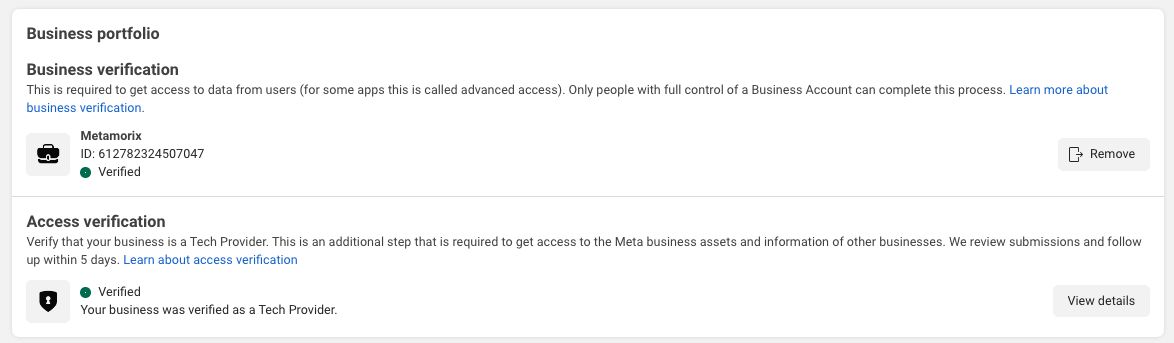
What this screenshot confirms, concretely:
- The business behind Botyoo is verified with Meta under Business Portfolio ID 612782324507047, not an anonymous app requesting access to your account.
- Botyoo passed Meta’s access verification as a Tech Provider, the extra review Meta runs (and follows up on within roughly 5 business days) before granting access to other businesses’ Meta assets.
- Botyoo operates under Meta’s Platform Terms, including the data-use and retention rules that come with that access.
This is not a self-applied label. The green “Verified” state and the line “Your business was verified as a Tech Provider” are issued by Meta inside Business Manager only after the review concludes.
Built on the official Instagram API, with App Review complete
Verification covers the business; the other half is the technical connection. Botyoo’s app, BOTYOO-IG, is configured directly on Meta’s official Instagram API: webhooks set up, Instagram business login enabled, and Meta’s App Review completed (the step Instagram requires before any app can access live data).
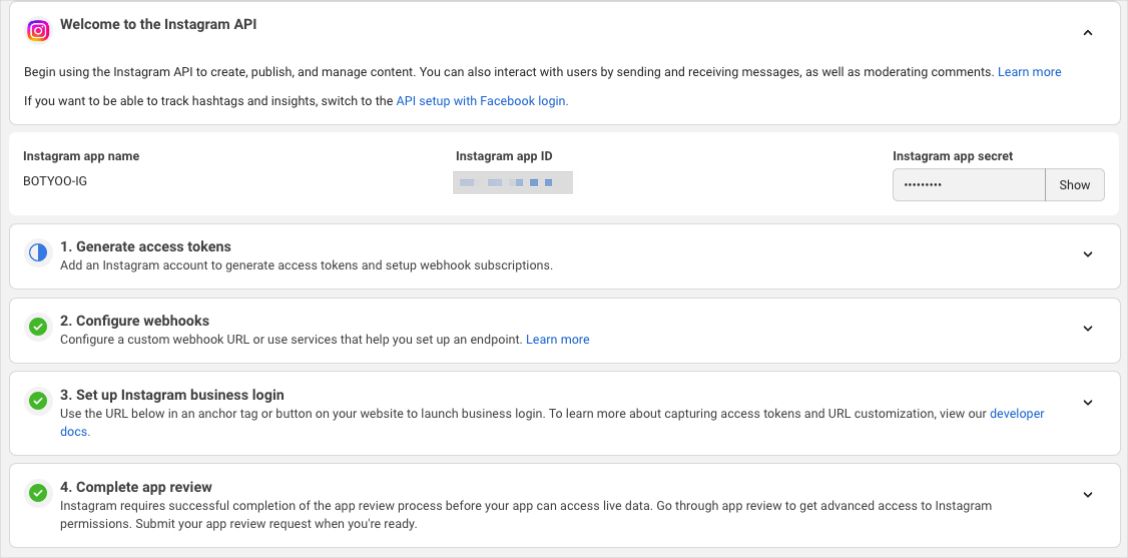
That’s why connecting to Botyoo uses Meta’s own login window and an official, revocable access token, never your Instagram password. You don’t have to take my word for any of it; Meta’s own dashboards are the proof, and they’re the same dashboards every Tech Provider is held against.
How to verify any tool’s Meta Tech Provider status (3 checks)
You should be able to do this for any Instagram automation tool, not just Botyoo. Three quick checks tell you whether a tool’s “Meta-approved” claim is real:
- Check the connection flow. Click “Connect Instagram.” If the tool redirects you to Meta’s own login window (the domain bar reads
facebook.comorinstagram.com) and asks you to grant specific permissions, it’s using the official API. If it asks for your Instagram username and password directly inside its own UI, it isn’t, and Tech Provider status would not apply. - Look for the issued badge and proof. Real Tech Providers can show the Business Manager “Verified” state under Access verification, with a Business Portfolio ID. Botyoo publishes both above. A tool that only displays a “Meta Verified” graphic on its homepage, with no Portfolio ID and no screenshot, is making a claim, not showing proof.
- Read the permissions screen. The Meta OAuth window names every permission requested (for example, “Send and receive messages on your behalf”). A Tech Provider operating on least-privilege rules will request the minimum set needed for the feature you’re enabling. A long, broad permissions list is a warning sign.
If a tool fails check #1, the rest doesn’t matter; it’s not on the official API at all. Botyoo passes all three by design.
What Meta Tech Provider status means for you
Verification is not an abstract badge; it changes how your account is actually handled day to day.
- No passwords, ever. You connect through Meta’s official OAuth login window. Botyoo never sees, stores, or transmits your Instagram password. The tool receives a revocable access token, not your credentials.
- No scraping, no risk to your account. Botyoo sends and receives DMs through the official Instagram Graph API, which is the method Instagram itself approves for business messaging. Password-based or browser-session tools are the ones that get accounts restricted; Botyoo is the opposite of that pattern.
- You’re always in control. Because access is a token granted through Meta, you can disconnect Botyoo at any time from your Instagram or Facebook settings, and the access ends immediately.
- Your data stays inside Meta’s rules. Tech Provider status means the permissions Botyoo holds, and what it may do with the data, are scoped and reviewed by Meta, not defined by Botyoo alone.
Botyoo’s other security and privacy measures
Meta verification is the foundation, not the whole story. A few of the practices behind Botyoo:
- Official OAuth connection. Authentication runs entirely through Meta’s secure login flow. Botyoo only ever holds a scoped, revocable access token for the permissions you approve.
- Encrypted in transit. All traffic between your browser, Botyoo, and Meta’s APIs runs over HTTPS / TLS 1.2+.
- Least-privilege access. Botyoo requests only the Instagram permissions it needs to run comment-to-DM and messaging automations, nothing broader.
- Disconnect and delete. Revoke access from your Meta settings whenever you want, and the associated token stops working. Your account control never leaves your hands.
- Built around GDPR principles. Botyoo’s data handling is designed to respect the access, control, and deletion rights that frameworks like the GDPR set out.
Botyoo is intentionally narrow: Instagram-only, focused on comment-to-DM plus built-in email capture, at a flat $3.60/mo. That focus is part of the security story; fewer permissions, fewer surfaces, one job done the official way. If you want the full context on why I built it this way, the Botyoo founder story walks through it.
Frequently asked questions
Is Botyoo a verified Meta Tech Provider?
Yes. Botyoo is a verified Meta Tech Provider under Business Portfolio ID 612782324507047, meaning Meta has confirmed Botyoo as a legitimate business and approved its use of the official Instagram Graph API through App Review. That status is what allows Botyoo to connect to your account and handle your DMs under Meta’s permission rules, rather than through any password-based workaround.
Will using Botyoo get my Instagram account banned?
No. Botyoo runs on the official Instagram Graph API, the exact method Instagram approves for business messaging, and never logs into your account with a password. The behavior that gets accounts restricted is unofficial scraping and login-session automation, which Botyoo does not do. Your automations stay inside Meta’s policies.
Does Botyoo see or store my Instagram password?
Never. You connect through Meta’s own secure OAuth login window, so your password is entered on Meta’s side and never passes through Botyoo. Botyoo receives only a scoped access token for the permissions you approve, and that token can be revoked at any time from your Instagram or Facebook settings.
What’s the difference between a Meta Tech Provider and a Meta Business Partner?
A Meta Tech Provider is verified for technical access to Meta’s official APIs and can process data under strict rules; this is the status that matters for an automation tool. A Meta Business Partner is recognized for marketing or advertising expertise and is listed in Meta’s directory. They measure different things; for safely connecting your Instagram DMs, Tech Provider is the relevant one.
How long does it take Meta to verify a Tech Provider?
Business verification and App Review can run in parallel and usually take a few weeks end-to-end, depending on how complete the submission is. The access verification step that issues the Tech Provider badge typically returns a decision within about 5 business days after the rest is in place. Botyoo cleared all stages before opening connections to the public.
Does Meta charge me to use Botyoo’s API access?
No. Meta does not bill you for Botyoo’s use of the Instagram Graph API. You pay Botyoo’s flat $3.60/mo subscription, and official API access is part of how Botyoo is built. There are no per-message or per-contact Meta fees passed on to you, which is one reason Botyoo can offer a single flat plan instead of usage tiers.
How do I disconnect Botyoo from my account?
You can revoke Botyoo’s access at any time from your Instagram or connected Facebook settings, under business integrations or apps. Because access is a token granted through Meta, not a stored password, removing it stops Botyoo’s access immediately and completely, with no further steps required on Botyoo’s side.
Why does Meta Tech Provider verification matter when choosing a tool?
Because it’s the one signal you can’t fake. Verification means Meta independently confirmed the company and reviewed how it uses your data before you ever connected. An unverified tool may still work, but you’re trusting it on its own say-so. With a verified Meta Tech Provider like Botyoo, Meta did the vetting for you.
Connect Botyoo with confidence
Botyoo is a verified Meta Tech Provider running entirely on the official Instagram Graph API: no passwords, no scraping, full control to disconnect whenever you want, all at a flat $3.60/mo. If you’ve been holding off on automating your DMs because you weren’t sure a tool could be trusted with your account, this is the part that should settle it.
See Botyoo’s flat-rate pricing or meet the founder behind Botyoo.
Last updated June 2026.